Teams & businesses
Tidy business books, right in the browser.
The Advanced view gives a finance team a double-entry ledger with the controls a business needs: roles and approvals, locked periods, PSAK-style statements and a complete audit trail.
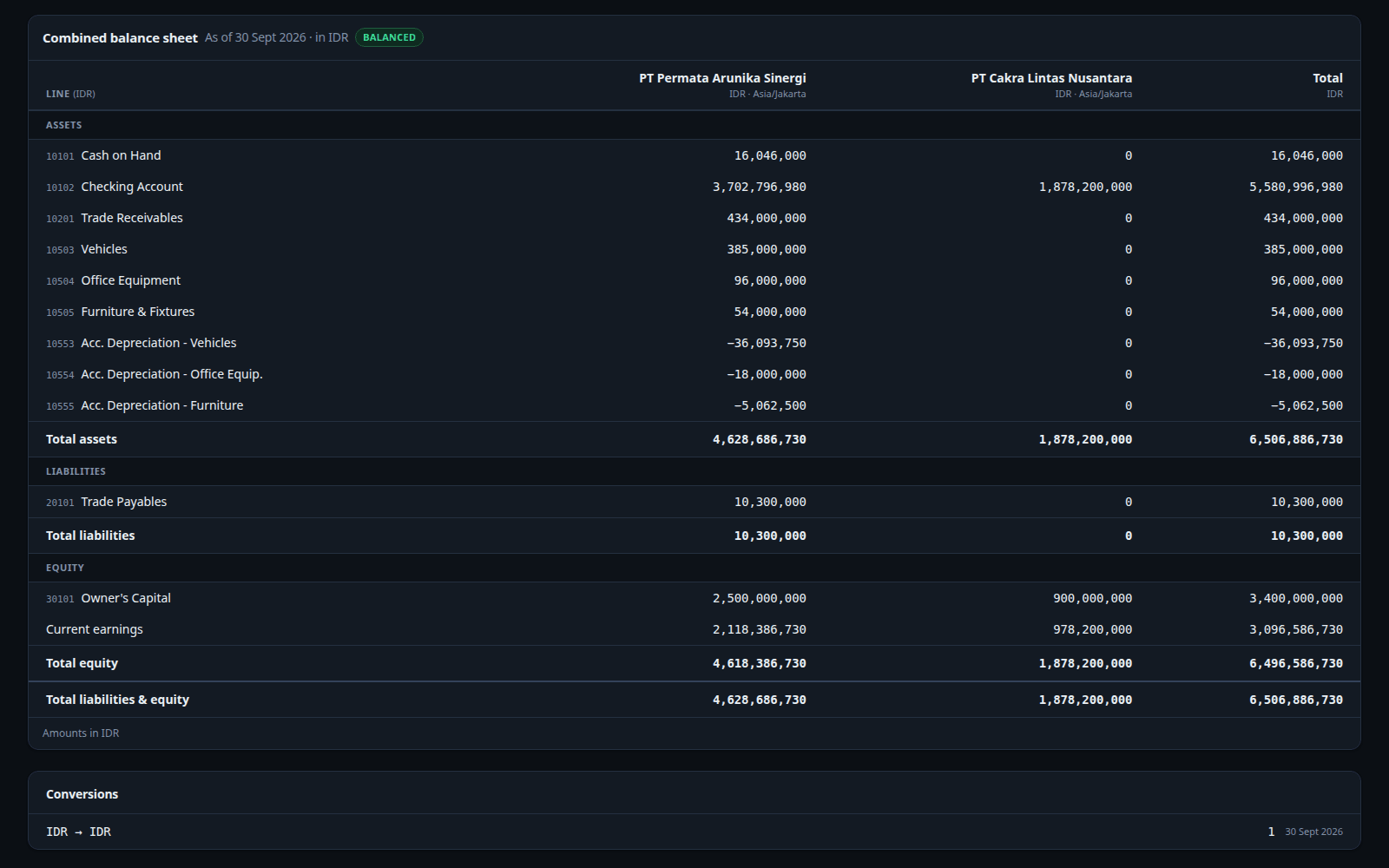
Financial control without a heavy ERP.
Financial statements
Balance sheet, income statement, direct and indirect cash flow, trial balance and general ledger from one ledger.
Members, roles and approvals
Five access levels, access scoped to specific accounts, and second-person approval above a threshold.
Monthly close
Periods lock after close; corrections are always a recorded reversal or void.
Departments and projects
Tag every journal line, then split the income statement by department or project.
Bank reconciliation
Import a bank statement from Excel, match it to the books, and turn bank charges into entries.
Fixed assets
Commercial depreciation, a tax book by asset group, and automatic deferred tax.
Several entities
One space per legal entity, each with its own base currency, then a combined report across spaces.
Import and export
Opening balances and transactions from Excel; reports to PDF and Excel, kept in an archive.
Pricing a new line or opening a branch? A business simulation shows break-even in your own units and when profit covers everything spent, without touching your books.Business simulation guide
Follows PSAK, in the terms your finance team already uses.
Statements and fixed-asset treatment follow the Indonesian Financial Accounting Standards, in Indonesian or English.
- General ledger and trial balance
- Lines per account or group, with running balances and a balance check.
- Commercial depreciation
- Under PSAK 216 (formerly PSAK 16), posted to the ledger month by month.
- Tax book
- By asset group, Groups 1–4 and buildings (Income Tax Law Article 11, PMK 72/2023), kept for the tax return.
- Deferred tax
- Under PSAK 212 (formerly PSAK 46), on the difference between the books — only the change is posted.
The monthly close, step by step.
Record and import
Daily transactions, journals and Excel imports. Recurring entries post themselves.
Approve
Writes above the threshold wait for another member's approval.
Reconcile the bank
Match the statement to the books; turn bank charges into entries.
Run depreciation
Run the month's depreciation and its deferred tax.
Lock and report
Lock the period, then export the financial statements to PDF or Excel.
Focused on finance, working alongside your tools.
In Degresh Finance
- Ledger, journal and chart of accounts
- Financial statements and general ledger
- Bank reconciliation
- Fixed assets, depreciation and deferred tax
- Budgets, approvals and audit trail
- Plans, cash look-ahead and business simulation
Stays in other software
- Tax calculation and filing (income tax, VAT)
- e-Faktur
- Billing and sales invoicing
- Payroll and inventory
Their results reach the ledger as journals or as transactions imported from Excel.
Move your team's books to Degresh Finance.
Early access is opening in stages for businesses. Tell us a little about yours and we'll let you know when it's your turn.